A Brief Intro to GlideAjax

What is GlideAjax?
GlideAjax is a way we can access server-side data from the client controller in ServiceNow. In particular, GlideAjax is useful for catalog items and record producers, where you can usually only use client-side code. For example, imagine you selected a value from a dropdown in a record producer, and another field auto-populated based on your selection. Or another dropdown’s options list changed. Or maybe you want to create a new user, and you assign a User ID, and then get a notice that that User ID is already taken. These are all use cases for GlideAjax.
GlideAjax in action
So how can you set this all up? To effectively use GlideAjax, you’ll need…
- A script include
- A call to the script include
Demonstrating with an example
For our example, we’ll be selecting an Incident from a dropdown on a catalog item. When we choose the incident, we want the Incident Short Description field to auto populate.
In the end, it’ll look something like this:


Please note: all code will be available for copy-and-paste at the bottom of this post!
Setting up our script include
First thing’s first, we need to set up a Script Include (System Definition > Script Includes). This will allow us to store our server-side code in a place that we can call over and over again.
So I’ve set mine up as follows:
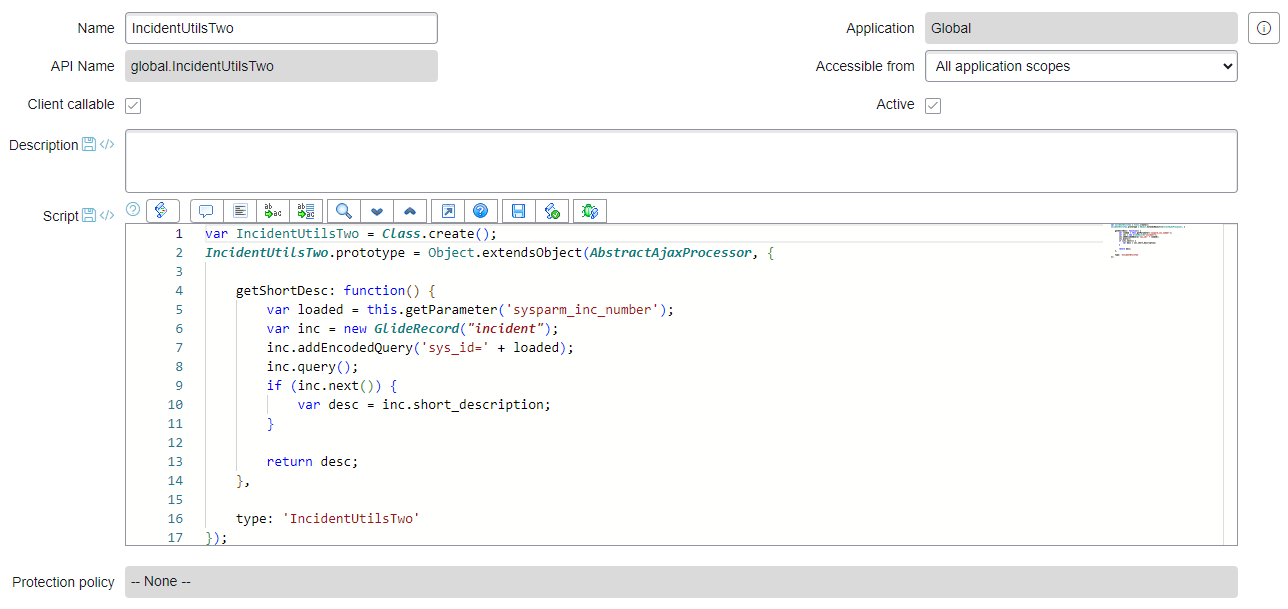
I’ve named it IncidentUtilsTwo, I’ve made it accessible from all scopes, and I’ve ensured it is client callable. Once you punch in a name for the script include, the API Name and some of the script will automatically fill out.
One thing I will call out is that I’ve added the additional text on line 2: Object.extendsObject(AbstractAjaxProcessor,. Why? I don’t entirely know, to be honest, but most of the posts I’ve read and scripts I’ve seen include it, and I struggle to get my GlideAjax to work without it. IMPORTANT NOTE: If you are in a scoped application, you will need to add global. in front of AbstractAjaxProcessor so the line reads Object.extendsObject(global.AbstractAjaxProcessor,.
Anyway, moving on. Line 4 of the script include is where you title your function. In this case, I’m calling my function getShortDesc. Inside the function call, I’ve got my standard server-script and end with a return statement. This way, we know when we call our function, we’re getting something back.
The last thing worth mentioning before we move on is line 5 – this statement: var loaded = this.getParameter('sysparm_inc_number'). In particular, I want you to focus on the getParameter function, which expects to receive sysparm_inc_number. sysparm_inc_number is one of the values I’ll pass along in my function call (which we’ll get to in the next section). So we’re passing through a parameter to our function, and the code is able to accept it by using the this.getParameter() function. I am simply locally naming this variable loaded to make it easier for me on line 7.
Setting up our call-to-the-script include
As mentioned, whenever I change the Incident I have selected, I want to see a new description appear. To make this happen, we’re using a Catalog Client Script. Specifically, we’re using an onChange client script.
Check it out:
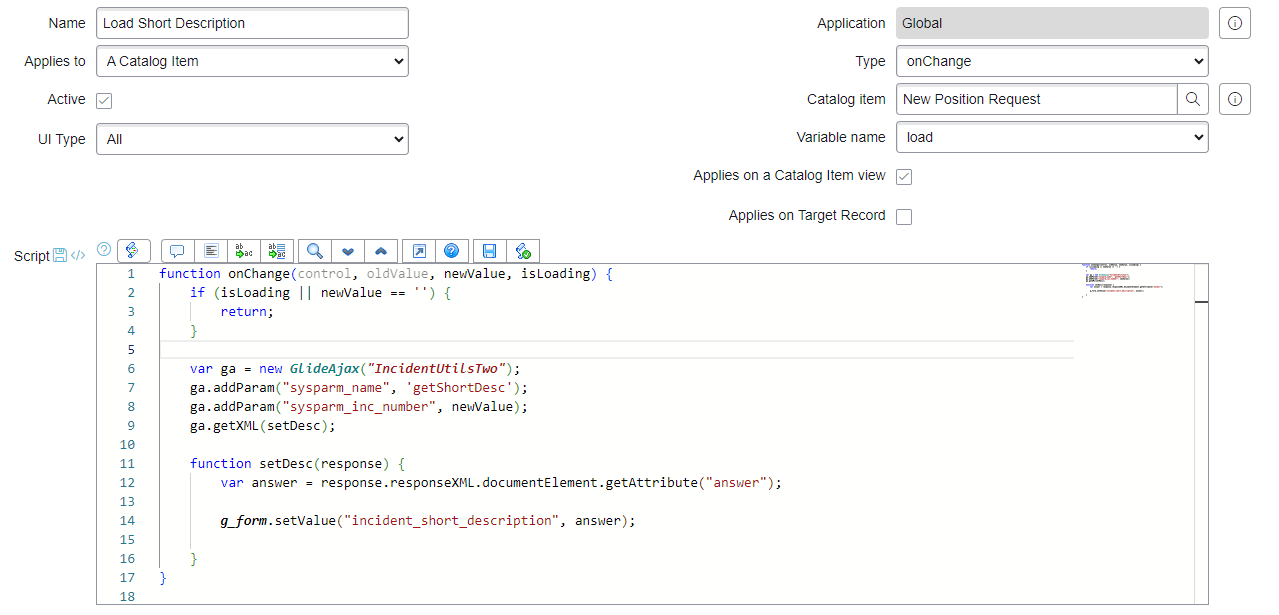
I’ve titled my client script Load Short Description, but you can call it whatever you want. It’s set to a Type of onChange and assigned to my specific catalog item. (Don’t get caught up on the catalog item here – it’s just a random catalog item I selected for the sake of this demo.) And lastly, this script is set to fire when the variable named load is changed.
For the record – load is the name of my select box (where you choose the Incident) and incident_short_description is the name of my text box (where we see the description).
On line 6, we establish that we’re calling a script include with the code var ga = new GlideAjax("IncidentUtilsTwo");. Basically, we are telling ServiceNow that when we use ga, we want to talk to the IncidentUtilsTwo script include we created earlier.
On line 7, we add a parameter to tell ServiceNow that we want to call the function called getShortDesc in the IncidentUtilsTwo script include. And on line 8, we pass through another parameter, sysparm_inc_number, with the value selected in the select box (newValue). On line 9, we use use the getXML function to get an XML response, passing through a function of our choice.
Line 11 contains the function of our choice, where we set up an answer variable to store the attribute returned in our script include function (getShortDesc). If you recall, the getShortDesc function in the script include is set up to return a string.
On line 14, we set the value of our field with the value returned in the XML.
Hopefully all of that makes sense. It’s a little bit confusing, but if you follow the mold, you’ll be able to achieve some really cool things. I would encourage you to ask ChatGPT if you need things broken out in more detail.
And as a reminder, you can check out my code below.
Code for copy-and-paste
Client script code
function onChange(control, oldValue, newValue, isLoading) {
    if (isLoading || newValue == '') {
        return;
    }

    var ga = new GlideAjax("IncidentUtilsTwo");
    ga.addParam("sysparm_name", 'getShortDesc');
    ga.addParam("sysparm_inc_number", newValue);
    ga.getXML(setDesc);

    function setDesc(response) {
        var answer = response.responseXML.documentElement.getAttribute("answer");

        g_form.setValue("incident_short_description", answer);

    }
}
Script Include code
var IncidentUtilsTwo = Class.create();
IncidentUtilsTwo.prototype = Object.extendsObject(AbstractAjaxProcessor, {

    getShortDesc: function() {
        var loaded = this.getParameter('sysparm_inc_number');
        var inc = new GlideRecord("incident");
        inc.addEncodedQuery('sys_id=' + loaded);
        inc.query();
        if (inc.next()) {
            var desc = inc.short_description;
        }

        return desc;
    },

    type: 'IncidentUtilsTwo'
});